JAZZ MUSIC RADIO
- 4.8
- Rating
- 1.00M
- Installs
- Free
- Price

 Analysis by App-foxy
I like jazz apps that get out of the way and let the music become part of the room. JAZZ MUSIC RADIO takes that approach: it is a free Music & Audio app from Digitally Imported Inc. built around jazz radio rather than a personal music library. After using it, I found its biggest strength to be its simplicity. You choose a channel, start listening, and let a continuous stream fill the background while you work, cook, read, or drive.
That simplicity is also where some users may hesitate. This is not the best choice if you expect to search for any recording, build a detailed playlist from your own collection, or control every song in the way you can with an on-demand streaming service. It makes more sense when you want curated radio and enjoy discovering what comes next. The app has an average rating of 4.8 from around 43 thousand ratings, with more than a million installs, so it clearly appeals to a wide audience. My experience was positive, but the right expectations matter.
Where the listening experience can become confusing
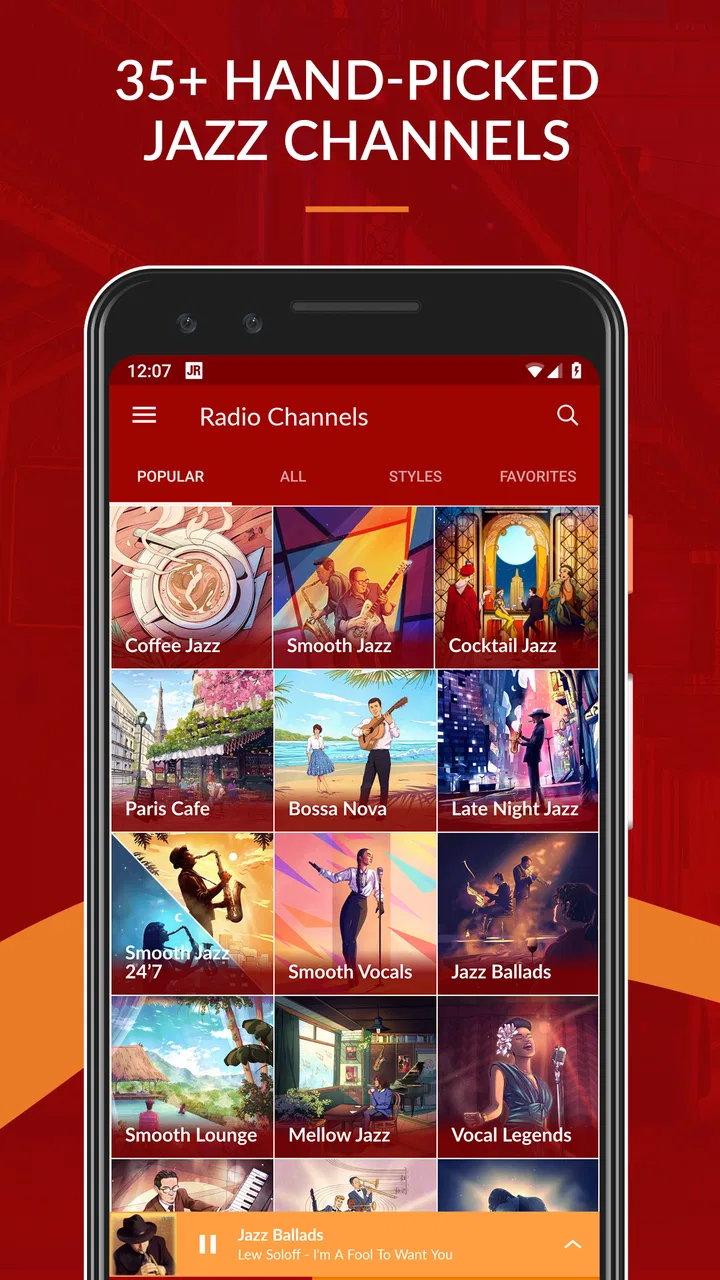
The first thing I would explain to a friend is that JAZZ MUSIC RADIO should be treated as a station-based listening app. Its focus is jazz radio, with more than 35 channels covering styles such as Smooth Jazz and Classic Jazz. That gives you variety without asking you to assemble a playlist, but it also means the app may feel limited if you approach it like a conventional music catalog.
You May Also Like

 Blood Strike: 2.5 Anniversary
Blood Strike’s Loadouts Turn Every Drop Into a Tactical Gamble
A close look at Blood Strike’s custom loadouts: how fast access to signature weapons reshapes its battle royale rhythm, rewards preparation, and narrows the gap between fights.

 Pandora - Music & Podcasts
Pandora’s Music Is Easy to Start, but Harder to Recover
Pandora’s strength is its low-effort path from a seed to a station. Its weak spot is how much confidence it asks you to place in connection, setup, and quiet recovery.

 8 Ball Pool
 Is Built on Rivalries, Rematches, and Routine
A close look at the rivalries, rematches, shared routines, and unanswered safety questions that turn a quick pool match into a persistent mobile community.

 Samsung Music
’s Quiet Strength Is Playing What You Already Own
Its reach comes less from spectacle than from dependable access to a personal library. That simplicity is both the app’s strongest retention engine and its ceiling.

 AccuWeather: Weather Radar
AccuWeather Review: A Quick, Clear Forecast for Everyday Decisions
For everyday plans, the best forecast is the one you can understand quickly. AccuWeather makes rain timing, radar, and local conditions easy to act on, with a few trade-offs.

 Hill Climb Racing
Why Hill Climb Racing Still Turns Crashes Into One More Run
A tiny car, a bumpy hill and one more upgrade: Hill Climb Racing keeps resurfacing because its simple chaos makes every near-miss feel personal.
More From Our News Desk



A common point of friction is choosing the right channel. Someone looking for relaxed background music may start with Smooth Jazz, while another listener may want a more traditional sound through Classic Jazz. The useful habit is to spend a few minutes sampling channels rather than judging the entire app from the first one you open. The channel list is the real heart of the experience, and different moods call for different starting points.
Another adjustment is accepting that radio listening is not fully predictable. You can influence the general style by selecting a channel, but you are not building a precise queue one track at a time. I actually enjoy that limitation when I am working because it prevents me from interrupting concentration to choose another song. If you need a particular album immediately, though, this format will feel less convenient than an on-demand alternative.
The free price makes it easy to try without committing money at the outset. The app is suitable for Everyone, which also makes it approachable for households where different people may use the same device. Optional in-app purchases range from around five dollars to around ninety dollars per item, so I would check the purchase screen carefully before confirming anything. The basic appeal is still the free radio experience, not the need to buy something before listening.
One subtle issue with radio apps is that users sometimes blame the app for a listening interruption when the actual problem is the phone, connection, or audio route. If playback stops, I do not immediately assume the station is broken. I first check whether other audio works, whether the device has switched to another output, and whether the app has simply been left inactive while the phone changes its background behavior.
What I check before blaming playback
My first setup check is the obvious one: confirm that the device is connected to the internet and that other apps can reach it. Because this is a streaming radio experience, a weak or inconsistent connection can look like an app failure. Moving from a poor signal area to a more stable connection is often more useful than repeatedly pressing the play control.
I also check the phone’s volume separately from the app’s playback state. A device can show that audio is playing while the media volume is turned down, muted, or routed to headphones or a speaker that is no longer nearby. Bluetooth is especially easy to overlook. If I expect sound from the phone but the phone is still connected to a car system or wireless speaker, the app may be working normally while the sound is simply elsewhere.
On Android, this app requires version 6.0 or later. That is a broad compatibility range, but an older phone can still behave differently from a newer one because of its system settings, available storage, or background activity rules. I would keep the operating system reasonably current where possible and install the current app version, which is 6.4.2.12751, through the normal app store process.
I would also avoid testing several possible fixes at once. If you clear app data, change audio output, restart the phone, and switch networks in the same minute, you will not know what solved the issue. A better sequence is to pause and resume playback, try another channel, verify the audio route, then restart the app. This small method saves time and makes recurring problems easier to understand.
A calmer setup for everyday listening
For a work session, I start by choosing a channel that matches the task rather than searching for a perfect song. Smooth Jazz is a natural fit for low-distraction background sound, while a more traditional channel can be better when I want to listen actively. I then set the volume before beginning the task and leave the phone somewhere accessible but not constantly in my hand.
That workflow matters because the app’s value is partly its ability to reduce decisions. If you keep opening the channel list every few minutes, you lose the benefit of radio. I prefer to give a station enough time to establish its mood. If it is not right, I change channels once and continue, instead of turning the listening session into a search exercise.
For driving, I would prepare the audio route before moving. Connect the phone to the car or speaker, start the station, and confirm that sound is coming from the intended output while parked. This is not a special feature of the app; it is simply a safer and less frustrating way to use any streaming audio service. The station format works well on a drive because it does not require constant song selection.
At home, the app can also work as a shared background source. One person can choose the general style, and everyone else can let the stream continue. That is more practical than arguing over individual tracks, although it also means the listener who wants precise control may prefer a personal library or an on-demand service.
Recovering a listening session without starting over
When playback fails, I use a short recovery routine. First, I check whether the problem affects one channel or the entire app. If another channel plays, the issue is probably related to the original stream or a temporary connection problem rather than the whole installation. If nothing plays, I check the network and audio output before closing the app.
Next, I stop playback and start it again. If that does not help, I fully close the app and reopen it. A phone restart is reasonable when other audio apps are also behaving strangely, but I would not make it the first response to every interruption. The goal is to separate a temporary playback hiccup from a wider device issue.
If the app opens but feels stuck, I check for an available update in the app store and make sure the device has enough free space for normal operation. I would be cautious about deleting app data unless I am comfortable resetting local app state. Clearing data can be a useful last resort for corrupted local settings, but it should not be treated as a routine button to press whenever a stream pauses.
It is also worth trying a different network, when practical. A home connection and a mobile connection may behave very differently even when both appear active. If the app works reliably on one but not the other, that points toward the connection rather than the station selection. This kind of comparison is more informative than repeatedly tapping play on the same network.
When the issue is sound rather than loading, I inspect the phone’s media controls, connected accessories, and any system-wide mute settings. I also check whether another app currently has control of the audio output. In my experience, these checks solve a surprising number of “the radio is silent” moments without requiring a reinstall.
One practical trade-off is that restarting the app may interrupt the sense of continuity that makes radio enjoyable. If I am listening casually, that is insignificant. If I am using jazz as a steady work backdrop, I try the lighter checks first so I do not turn a small pause into a full reset. Once playback returns, I leave the chosen channel running instead of changing several settings unnecessarily.
When the app is not the cause
Streaming audio depends on more than the application itself. A congested network, an unstable wireless speaker, a car system that has selected another source, or a phone that is restricting background activity can all create similar symptoms. That is why I judge the app after checking the complete listening chain: connection, phone, app, and speaker.
Battery-saving behavior can also affect how background audio behaves on some phones. The exact controls differ between devices, so I would look for the phone’s own battery or background-activity settings rather than changing random options. If playback stops only after the screen has been off for a while, that pattern is a useful clue that the device is managing background activity.
Likewise, a channel change that takes longer than expected does not automatically mean the application has crashed. Radio streams can take a moment to reconnect after a network shift. I give it a little time, then test another channel. If every other audio service is also slow, I investigate the network first.
The developer is Digitally Imported Inc., a name associated here with a focused radio experience rather than a broad, all-purpose music marketplace. That focus is important when comparing it with alternatives. A large on-demand service is better for exact tracks, albums, lyrics, downloads, and carefully managed playlists. A personal music player is better when you already own files and want local control. JAZZ MUSIC RADIO is better when you want jazz organized into stations and do not want to curate every minute yourself.
There is another comparison worth making with general internet radio. A broad radio app may offer many genres, but its jazz selection can be buried among unrelated stations. Here, the entire product is centered on jazz, which reduces browsing effort for someone who already knows that is the sound they want. The trade-off is obvious: listeners who regularly move between jazz, classical, podcasts, pop, and news may prefer one broader app instead of a dedicated jazz tool.
I would skip this app if your main requirement is ownership or offline listening. I would also skip it if you dislike programmed radio and want to reject individual songs constantly. The app’s appeal depends on being comfortable with a channel’s overall direction. It is a poor fit for someone who wants a specific recording at a specific moment, even if that person enjoys jazz.
On the other hand, I would recommend trying it if you want a low-effort soundtrack for reading, office work, dinner, or a long drive. It is especially useful for people who know the mood they want but do not want to spend time making a playlist. The channel approach can also introduce styles you might not have selected manually, which is one of the pleasant surprises of radio listening.
How I would use it over a normal week
On a weekday morning, I would choose a gentle station while preparing breakfast and getting ready. During focused work, I would stay with the channel that creates the least distraction, keeping the phone out of reach so the music remains a background layer rather than another task. In the evening, I might switch to a livelier jazz option and listen more actively while cooking.
The important part is not changing channels constantly. I treat each channel as a mood preset, not as a single-song recommendation. If I am hosting friends, I would start the stream before people arrive, check the speaker connection, and let it run. That avoids the awkward habit of passing a phone around to choose every next track.
For troubleshooting, I would remember which channel was playing when a problem occurred, whether the screen was on or off, and whether the phone was connected to another device. Those details make it easier to identify a pattern. A one-time pause is not the same as a repeatable failure after the screen locks or after the phone changes networks.
The app is free to begin with, but I would still review any optional purchase prompt carefully, particularly if a child uses the device. Its Everyone content rating makes the app broadly accessible, yet purchase decisions remain something I would keep under the account holder’s control. That is a sensible habit for any free app that offers in-app purchases.
After spending time with it, I see JAZZ MUSIC RADIO as a focused listening tool rather than a complete replacement for every music service. Its strongest quality is the combination of jazz specialization and low decision-making. I can select a style, start listening, and return my attention to whatever I was doing. That is a real advantage, not merely a simpler interface.
Its limitations are equally clear. The station format does not satisfy precise song requests, and streaming depends on a working connection and a correctly configured audio path. Some setup friction may come from the phone, Bluetooth, the car, or battery management rather than from the app. Once those factors are understood, recovery is usually more straightforward.
My practical verdict is that this is a good free choice for listeners who want continuous jazz radio, especially Smooth Jazz or Classic Jazz, without building playlists. I would recommend it to a friend who wants background music with enough variety to avoid repetition by choice. I would point that friend toward an on-demand service instead if exact albums, offline access, or detailed queue control matter more than effortless station listening.
With its Everyone rating, compatibility with Android 6.0 and later, current version 6.4.2.12751, and strong response from listeners, it is easy to try. Just approach it as a dedicated radio companion from Digitally Imported Inc., not as a searchable music warehouse. The best reason to install it is simple: choose a jazz mood, solve the basic audio setup once, and let the music do its job.
FAQs for JAZZ MUSIC RADIO
01What is Jazz Music Radio?
Jazz Music Radio is a streaming app focused on jazz, offering access to a broad selection of stations and channels dedicated to different styles, moods, and eras. Depending on the station you choose, you may hear smooth jazz, bebop, swing, blues, vocal jazz, contemporary jazz, or instrumental performances. It is designed for listeners who want continuous jazz playback without creating individual playlists.
02Does Jazz Music Radio require an internet connection?
Yes, Jazz Music Radio generally requires an active internet connection because it streams music rather than storing complete stations on your device. It can work over Wi-Fi or mobile data, but streaming for long periods may use a noticeable amount of your data allowance. For the best experience, especially when listening for hours, Wi-Fi is recommended to reduce buffering and avoid unexpected mobile-data charges.
03Is Jazz Music Radio free to use?
Jazz Music Radio can typically be used without paying for basic access, although the exact features and limitations may depend on the version of the app and your region. Free listening may include advertising or restrictions on certain functions. Before downloading, users should check the current store description and in-app subscription details to confirm whether premium options, ad removal, or additional features are available.
04What type of jazz music can I listen to in the app?
The app is suitable for listeners with varied jazz preferences because it usually organizes content into channels or stations based on genre, style, and atmosphere. You may find options such as smooth jazz, classic jazz, piano jazz, vocal performances, Latin jazz, fusion, swing, blues-related selections, and relaxing background music. Station availability can change, so the available categories should be reviewed inside the app.
05Is Jazz Music Radio available for both Android and iPhone?
Jazz Music Radio may be available on Android and iOS, but compatibility can depend on the specific app version, device model, operating-system version, and the developer’s current distribution. Before installing, search for the official listing in Google Play or the Apple App Store and verify the publisher name, ratings, permissions, and recent update information. Avoid downloading unofficial copies from unknown websites.
Pros
- Large selection of jazz channels organized by style and mood.
- Ad-free listening available with the premium subscription.
- Simple interface makes switching between stations quick and easy.
- Streams smoothly on most mobile connections with adjustable audio quality.
- Useful sleep timer helps stop playback automatically at bedtime.
Cons
- Free listening includes advertising and some feature limitations.
- Many channels require an internet connection to play.
- Offline downloads are not available for every listening situation.
- Audio quality depends on the selected plan and network stability.
- The number of stations can feel overwhelming for new listeners.

JAZZ MUSIC RADIO
Gallery